For a long time I wanted to securely expose APIs and webhooks behind Cloudflare Access without opening them publicly or disabling authentication entirely.
The problem was always machine-to-machine traffic.
Cloudflare Access works great when a human is opening an application through a browser and authenticating with SSO, email OTP, or another login method. But automation tools, webhooks, or agents do not handle interactive authentication flows very well.
I finally spent some time testing this properly, and it ended up being much simpler than I expected.
The workflow, an Apple Shortcut triggering a webook in self-hosted n8n, behind Cloudflare Access and Cloudflare Tunnel.

The Idea
Cloudflare Access supports non-interactive authentication using Service Tokens .
Instead of authenticating through the browser, the client sends two HTTP headers:
CF-Access-Client-Id
CF-Access-Client-Secret
Cloudflare validates the headers before forwarding the request to the protected application.
Architecture
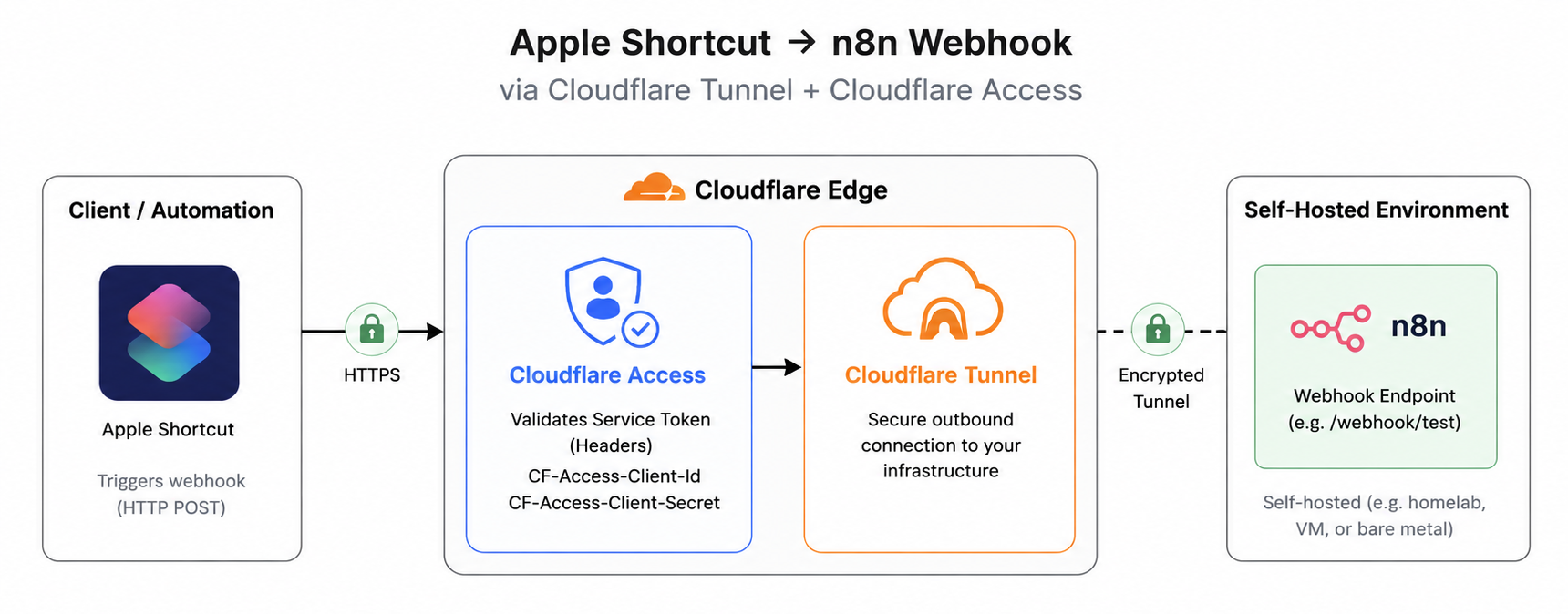
The important part is that the application still remains protected behind Cloudflare Access. You are not creating a public bypass or exposing a separate unauthenticated endpoint just for automation traffic.
Creating the Service Token
In Cloudflare Zero Trust go to:
Access controls → Service credentials → Service Tokens
Create a new Service Token.
Example:
Service token name: n8n-shortcuts
Service Token Duration: 1 year
Cloudflare generates two values:
CF-Access-Client-Id
CF-Access-Client-Secret
Save both securely because the secret will not be shown again afterwards.
Allow the Service Token
Next, open the protected application:
Access controls → Applications
Edit the application and create a new policy:
Action: Service Auth
Include: Selector → Service Token
Select the Service Token you created earlier.
After saving the policy, requests containing the correct headers can authenticate programmatically without going through the interactive login portal.
Testing with curl
Before testing this with Apple Shortcuts or n8n, I first validated the flow with curl:
curl -X POST https://n8n.example.com/webhook/test \
  -H "CF-Access-Client-Id: YOUR_CLIENT_ID" \
  -H "CF-Access-Client-Secret: YOUR_CLIENT_SECRET" \
  -H "Content-Type: application/json" \
  -d '{"message":"hello"}'
If the headers are valid, Cloudflare Access forwards the request normally to the backend service.
One thing I liked while testing this is that you do not even need a real API behind the tunnel initially. You can simply protect a normal website with Cloudflare Access and use curl with the headers to validate that authentication works end-to-end before involving your automation tooling.
If authentication does not work, Cloudflare Zero Trust also makes troubleshooting pretty easy. In the Access controls → Service credentials → Service Tokens page, you can check the Last Seen column for your token. If the timestamp updates after your curl request, Cloudflare is receiving and validating the token, which helps narrow down whether the issue is in Access policies or your backend application.
What I Learned
I originally assumed Service Tokens were going to involve something more complex, but they are actually pretty straightforward. Cloudflare Access simply validates the headers and forwards the request if they match a valid token.
For homelab and self-hosted setups, this ends up being extremely useful for things like:
- webhooks
- automation workflows
- AI agents
- internal APIs behind Cloudflare Tunnel
I also expected this to be a paid-only enterprise feature, but Cloudflare includes Service Tokens in the Zero Trust free plan. The free tier currently supports up to 50 Service Tokens, which is honestly plenty for most homelab and automation use cases.
You keep the service protected while still allowing secure machine-to-machine communication without exposing the application publicly.